VistaKine:
Interactive 3D Physics
Role
Solo — Designer & Developer
Timeline
2024 – Present (Ongoing)
Status
Live at vistakine.com
Tech Stack
Three.js · Rapier · Svelte · TypeScript
The Problem
Physics education has a fundamental disconnect problem. Students spend hours with equations and static diagrams, but struggle to develop an intuitive sense of why things move the way they do. A free body diagram on paper looks nothing like the real forces acting on a sliding block.
Khan Academy and YouTube videos are great for explanation, but they're passive. You watch. You don't build, throw, or break anything. The moment a student can grab a virtual object, apply a force, and watch it actually happen in 3D — something clicks that no video can replicate.
Physics isn't abstract. The way we teach it is.
The Solution
VistaKine is a browser-based 3D physics platform built around three core verbs:
Learn
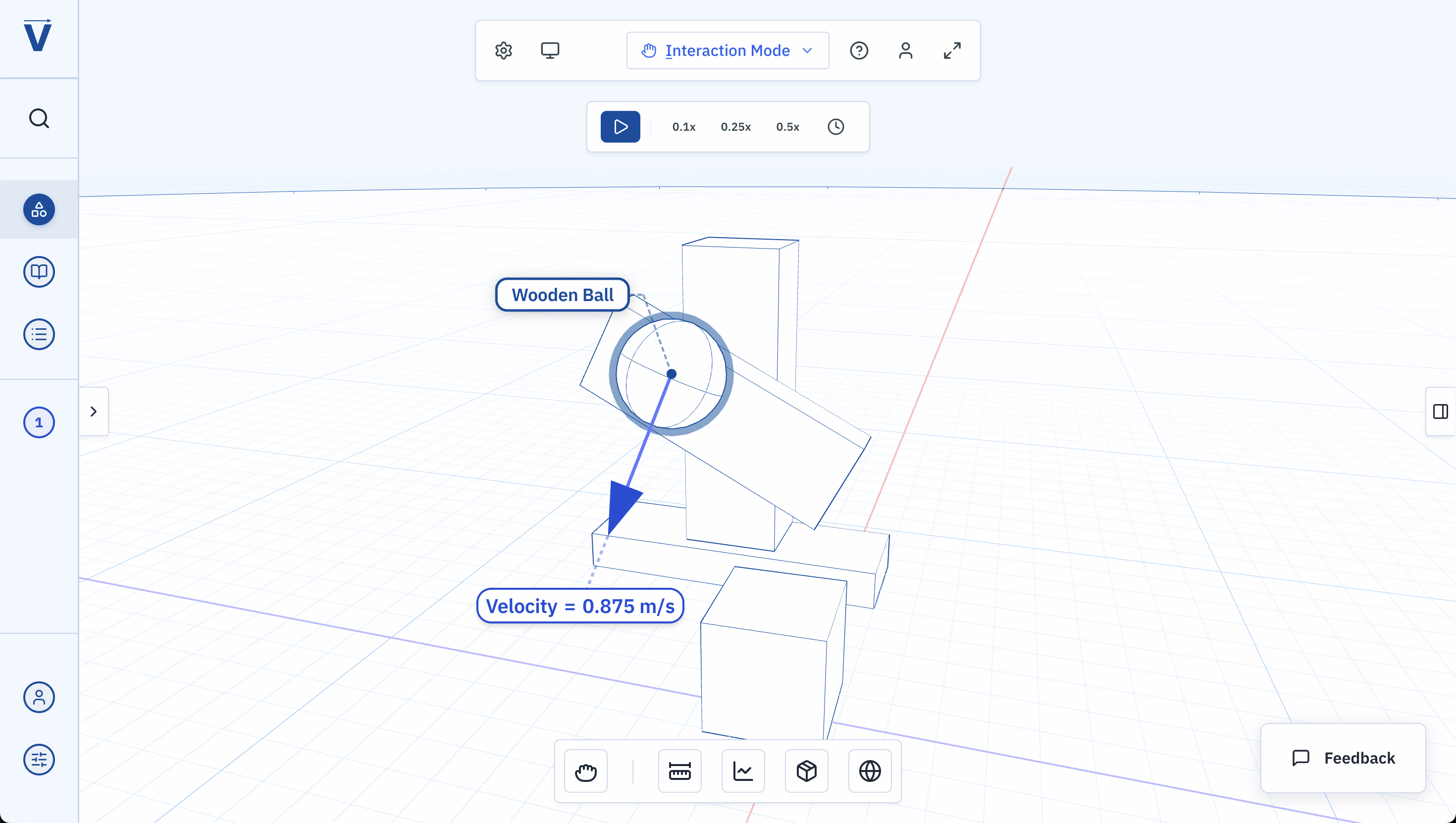
Free body diagrams and force vectors visualized in real time. See forces, momentum, and motion as they actually occur — not as labeled arrows on a static page.
Build
Transform and scale controls let students construct scenes from simple ramps to elaborate contraptions. Objects connect with joints; structures obey real physics.
Play
Physics-based controls that feel real and tactile. Grab, throw, and manipulate objects directly. Trigger the fracture system. Slow time to analyze collisions in detail.
Key Features
Real-Time Force Visualization
Force vectors, momentum arrows, and free body diagrams update live as objects interact. Students don't just see the outcome — they see the physics driving it.
Construction System
A full transform and scale interface lets users build custom setups. Joint connections between objects open up experiments that go far beyond textbook problems.
Fracture System
Objects can shatter based on impact forces, making concepts like impulse and energy transfer viscerally understandable — and genuinely satisfying to trigger.
Time Control
Slow motion lets students pause and analyze fast collisions frame by frame. A feature that lets any physics moment become a teachable one.
Structured Curriculum
Chapters, a table of contents, and a glossary scaffold the experience. Currently covers Kinematics in One Dimension, with more modules in development.
No Install Required
Runs entirely in the browser. No download, no app store, no friction. Students can be in the simulation within seconds of clicking a link.
Building It Solo
VistaKine is a solo project in the fullest sense: design, engineering, curriculum writing, and distribution are all handled by one person. That creates constraints that most projects don't face — every design decision has to survive implementation, and every engineering decision has to survive actual use by real students.
The Stack
Three.js handles all 3D rendering. Rapier runs the physics simulation — chosen for its Rust/WASM core, which makes it fast enough to simulate complex scenes in real time in the browser. Svelte manages the UI layer, keeping the interface reactive without fighting the render loop.
One of the hardest technical challenges was keeping physics simulation and 3D rendering in sync without either one bottlenecking the other. The solution was decoupling the Rapier step from the Three.js render loop, then interpolating positions between physics frames.
The Real Challenge: Distribution
At this point the technical challenges are manageable. The harder problem is getting it in front of students and educators. Physics teachers don't have time to evaluate new tools — their curriculum is already set. Getting VistaKine adopted means meeting them where they are, speaking the language of curriculum standards, and proving value quickly.
This is an ongoing challenge, and one that's shaped the product: every feature added has to be immediately intuitive. There's no onboarding budget. If a student lands on the playground and isn't engaged within 30 seconds, they're gone.
What's Next
Additional modules covering Newton's Laws, Conservation of Energy, Rotational Motion, and Harmonic Motion are planned. The current focus is on deepening the Kinematics chapter and expanding the glossary into an interactive reference tool.